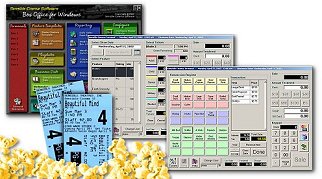

Skins are enabled from the Configuration Menu master Settings under the Miscellaneous Tab.

Frequently Asked Questions:
What Does This Do?
Terminals & Terminal Usage - Once all of your terminals have been installed, you may assign them nicknames on your system rather than calling them simply Terminal #1, Terminal #2, etc. Each of the terminal nicknames you have entered will appear under "Terminals" on the Manager's screen. If any of the terminals are currently online, the terminal nickname is highlighted and the viewing of that terminal's real-time sales is permitted. You may also select to view all sales from all terminals while viewing the usage of a single terminal. From the non-skinned view, simply left-click. From any skinned view, double-left-click.

Depending on the terminal type you are viewing, up to three journals may be available for viewing real-time sales, tickets, concessions and transactions. The Ticket Log shows the sale of each individual ticket as it happens, refreshed at an interval you set using the slider control. The Concession Log displays individual items rung up as they are sold. The transaction log shows sales as they are completed. The refresh rate can be set by moving the slider bar to the appropriate refresh rate. You can periodically get a total for all items by pressing the "Query Totals" button.

Master Feature Template - Each new film is first added to the system here and playdates are created based on the features listed in this feature template.
Master Showtime Template - Each new film is first added to the system in the feature template, showtimes for those features are set up here and playdates are created based on the features listed in this feature template and these showtimes.
Playdates - This is where a new playdate is created based on the films and shows listed in the master templates. Playdates may be edited and deleted here as well. Tickets for playdates may be sold as soon as they are created. The cash is applied to the current business date while the ticket appears on the box office report for the playdate.
Terminal Nicknames - Personalize the names of the terminals 1-12.
Business Date - The business date is the current date for which sales (money) is applied.
Change User - Allows you to switch users without exiting the program.
Reports - Daily Reports (daily box office and sales summary reports including concession sales), Weekly Box Office Reports (reports submitted with film rental payments), Weekly Sales Summary (reports showing store sales for a seven day period), Concession Reports (inventory, yields, and purchasing reports), Browse Reports Folder (search for saved reports.
Home Office E-Mail - Send e-mail messages or files to a pre-defined home office e-mail address.
Configure Master Settings - Change master settings, ticket prices, concession items, program preferences, etc.
Help and Support - View help documentation, view program version information, check for updates, request support, repair a database